What is Fake Update?
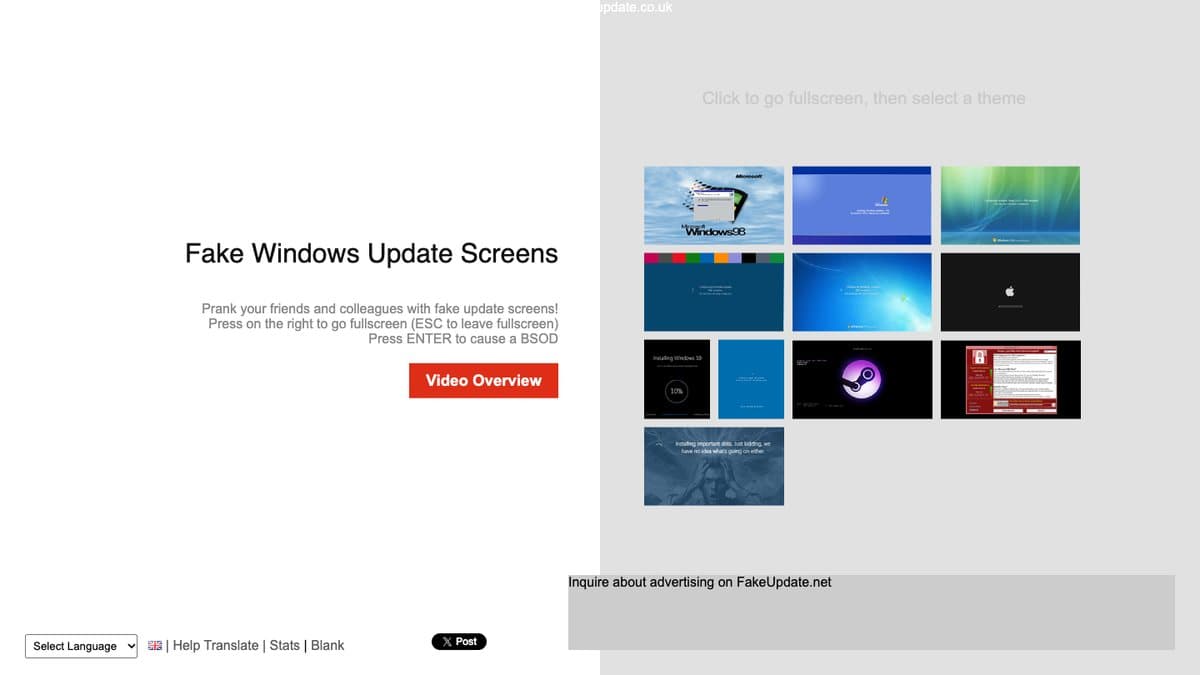
Fake Update shows a convincing operating system update screen that never finishes. You pick a style, press F11 to go full screen, then walk away and let someone else wonder why the computer is stuck at 37 percent. Nothing is actually installed or changed, it is just a web page.
The site was built by fedia (fediaFedia) and has been running for years, long enough that the creator keeps a joke list of copycat sites in the page source. It covers Windows 98, XP, Vista, 7, the 8/10/11 style, Windows 11 install and update screens, macOS and Steam OS, plus a blank screen for extra monitors and a sarcastic custom option. Fake update pranks are a regular on TikTok, mostly in offices and on parents' laptops.
What You Can Do
- Pick from Windows 98, XP, Vista, 7, 10/11, macOS, Steam OS and more
- Go full screen with F11 so the browser disappears
- Press Enter on some screens to trigger a fake blue screen
- Use the blank option to cover a second monitor
- Choose from around 30 languages
How to Play Fake Update
- Open Fake Update and click the operating system you want to fake.
- Press F11 (or your browser's full screen shortcut) to hide the browser bar.
- Leave the computer and wait for someone to notice.
- Press Esc or F11 again to exit when the joke is over.
Is Fake Update Free?
Fake Update is free to use and supported by ads. There are no paid screens or sign-up.
Who Will Enjoy It?
- Office pranksters looking for a harmless joke
- Kids who want to fool a parent for a minute
- Content creators filming reaction pranks
- Anyone who needs a screen that looks busy
Websites Like Fake Update
- Hacker Typer: Another screen prank: mash keys and look like a movie hacker.
- The Useless Web: More silly single-purpose websites a click away.
- Eel Slap: A short, silly web toy for when the prank is done.
Frequently Asked Questions
Is Fake Update free?
Yes. Every screen is free to use and the site runs on ads.
Does Fake Update change anything on my computer?
No. It is only a web page made to look like an update screen. Close the tab and everything is normal.
How do I exit a Fake Update screen?
Press Esc or F11 to leave full screen, then close the tab.