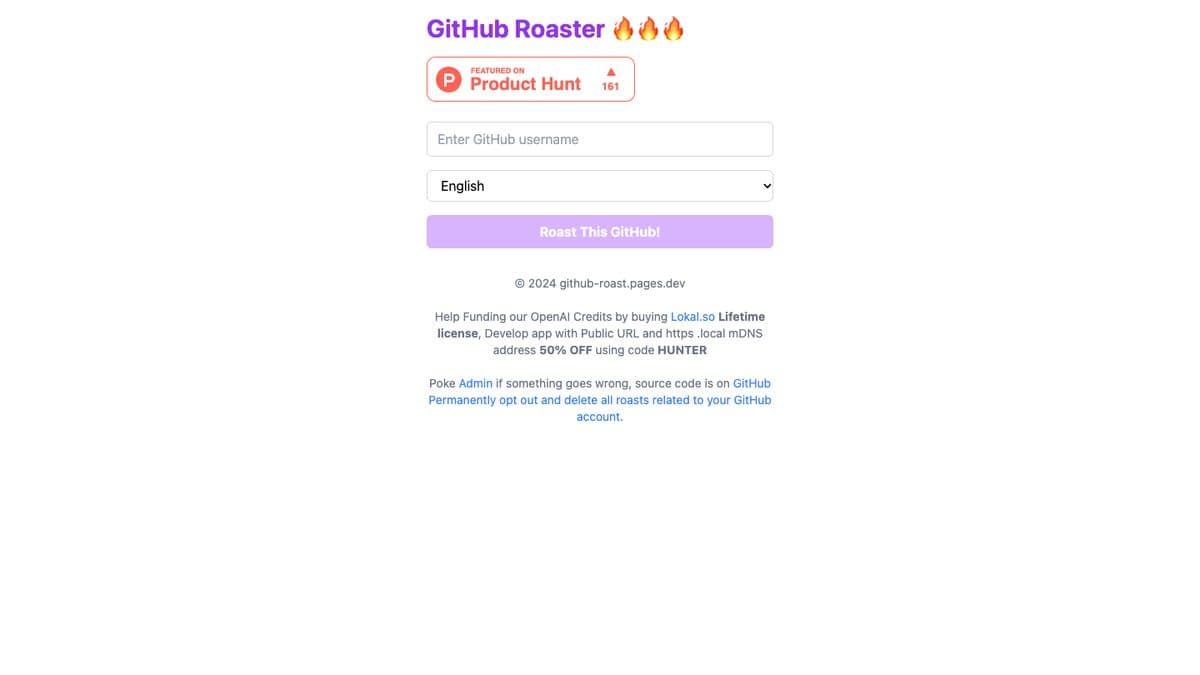
What is GitHub Profile Roast?
GitHub Profile Roast does exactly what the name says. Enter a GitHub username and an AI looks at the public profile, the repos, the follower count, the bio and the commit habits, then writes a short roast of it. Abandoned side projects and forks with no changes are favourite targets.
It launched on Product Hunt on August 7, 2024 and spread quickly through developer communities, with people sharing their roasts on X, Lobsters and team Slack channels. The roast is available in 17 languages, including English, French, German, Japanese, Hindi, Indonesian and Javanese. The project is open source, and there is a link to permanently opt out and delete any roasts about your account.
What You Can Do
- Roast any public GitHub profile by username
- Pick from 17 languages for the roast
- Share a link to your roast
- Roast friends, coworkers or famous developers
- Opt out and delete roasts of your own account
How to Play GitHub Profile Roast
- Open github-roast.pages.dev.
- Type in a GitHub username.
- Choose a language from the list.
- Click 'Roast This GitHub!' and read the result.
Is GitHub Profile Roast Free?
GitHub Profile Roast is free with no login. The page asks visitors to help cover its AI costs by buying a separate product, but that is optional.
Who Will Enjoy It?
- Developers who can take a joke about their side projects
- Teams looking for a laugh in a group chat
- Coding students who want a light-hearted profile review
- Anyone who enjoys roast humour
Websites Like GitHub Profile Roast
- Goody-2: Another AI that is funny on purpose, this time by refusing everything.
- This Word Does Not Exist: A quick AI toy for a laugh in seconds.
- Turing Test Live: See if you can tell an AI from a human in conversation.
Frequently Asked Questions
Is GitHub Profile Roast free?
Yes. It is free to use and does not need you to log in.
Can I roast someone else's GitHub?
Yes. It works on any public GitHub username.
Can I remove roasts about my account?
Yes. The site has a link to permanently opt out and delete roasts related to your GitHub account.