
What is Listen to Wikipedia?
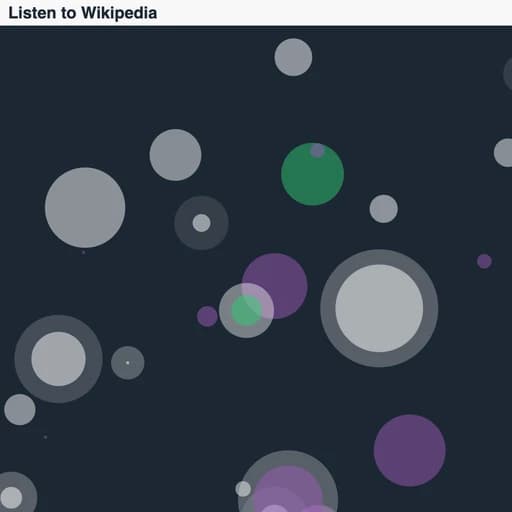
Listen to Wikipedia plays the sound of Wikipedia being edited, live. Every time someone changes an article, a bubble appears on the screen with the article's title and a note plays: a bell when text is added and a string pluck when text is removed. The bigger the edit, the deeper the note, and a counter in the corner shows how many edits are happening each minute.
It was built by Hatnote, Stephen LaPorte and Mahmoud Hashemi, and is based on BitListen by Maximillian Laumeister. Green circles are edits from unregistered contributors, purple circles are bots, and a blue banner with a string swell announces each new user, who you can welcome on their talk page. You can listen to more than 40 language editions of Wikipedia plus Wikidata, hide the titles or the graphics for background listening, and only hear edits tagged with a hashtag. The code is open source on GitHub.
Main Features
- Live sound from Wikipedia's recent changes feed
- Bells for additions and string plucks for removals
- Deeper notes for bigger edits
- Colour coded bubbles for unregistered users and bots
- New user announcements with a link to welcome them
- More than 40 Wikipedia languages plus Wikidata
- A hashtag filter to hear only tagged edits
- A background mode that hides the graphics
How to Get Started with Listen to Wikipedia
- Open listen.hatnote.com in your browser.
- Click anywhere on the page to turn the sound on.
- Watch bubbles appear as people edit Wikipedia around the world.
- Scroll down to pick another language or change the settings.
- Leave it playing in the background as calm music while you work.
Listen to Wikipedia Pricing
Listen to Wikipedia is free, with no ads and no sign up needed. The site uses Google Analytics to count visitors.
Who Should Use It?
- Anyone who wants calm background sound while working
- Wikipedia fans curious how often it changes
- Teachers showing that Wikipedia is written by people
- Fans of data art and sound toys
- Students who like to study with ambient sound
Listen to Wikipedia Alternatives
- The Duck Pond is a live pond of ducks whose quacks are made in real time as you listen.
- Lofi Cities plays endless lofi music composed in your browser over pixel art cities.
- Typatone turns every letter you type into a musical note.
Frequently Asked Questions
Is Listen to Wikipedia free?
Yes. Listen to Wikipedia is free, with no ads and no account needed.
Why can I not hear anything?
Browsers block sound until you interact with the page. Click anywhere when it says click to enable sound, and check the volume slider at the top.
What do the sounds mean?
Bells are additions and string plucks are removals. The bigger the edit, the deeper the note, and a string swell means a new user just joined Wikipedia.
Who made Listen to Wikipedia?
Hatnote, Stephen LaPorte and Mahmoud Hashemi, built it. It is based on BitListen by Maximillian Laumeister, and its code is on GitHub.
Can I listen to other languages?
Yes. You can pick from more than 40 language editions of Wikipedia, plus Wikidata.